Techs&Devs Solutions

Built in the field. Proven under pressure.

We build custom management systems around how you run, and deploy two ready systems of our own — Dineo for point of sale and operations, ClockWise for attendance and payroll. Designed for businesses where a system going down means the day stops.

In daily production since 2023 Arabic & English, fully RTL Dineo runs offline, syncs when it can

No pricing commitment. We look at how you actually run before we quote.

How Techs&Devs systems connect Your business at the centre, connected to an ERP or management system, Dineo POS, ClockWise HR, mobile apps, clocking machines, scales, printers and kitchen screens, and branch sync. ERP systems Dineo POS Branch sync Printers & screens Scales Clocking machines Mobile apps ClockWise HR Your business one connected system
2023
In daily production since
5
Dineo modules, plus online menu and delivery app
2
Languages, fully RTL
Offline
Dineo branches keep selling when the internet drops

What we do

Three ways we work with you.

A system built around your business, or one of ours ready to deploy — installed, trained and supported by the people who built it.

Built for you
Custom systems

Management systems and ERP designed around how your business actually runs. One delivery can cover the software, the mobile apps, the hardware and the connections between them.

  • Management systems and ERP to your requirements
  • Mobile apps for your staff and your customers
  • Integration with hardware and machinery — scales, printers, clocking machines and more
Discuss a project
Ready to deploy · Operations
Dineo

Point of sale and operations for restaurants, retail and multi-branch groups — POS, back office, inventory, reservations and accounting.

  • Keeps selling when the internet drops
  • Two currencies on every bill
  • Arabic receipts and kitchen tickets
See Dineo
Ready to deploy · People
ClockWise

Attendance, payroll and HR, from clock-in to payslip — for one branch or many.

  • Works with any ADMS clocking machine
  • Attendance to payroll, no spreadsheet in between
  • Full user manual in English and Arabic
See ClockWise

Ready to deploy

Two systems. One for your operations, one for your people.

Both built for the same reality: multiple branches, real staff, daily pressure, and an internet connection you can't depend on.

Operations
Dineo

A modular platform for restaurants, stores and venues: restaurant POS, back office, inventory, reservations and accounting — plus an online menu and a delivery app. Deployed per branch, controlled centrally.

  • Every branch keeps selling when the line drops
  • Two currencies on every bill, at the rate you set
  • Kitchen, bar and cashier printers over direct IP
  • Modular — turn on only what you need
Explore Dineo
People
ClockWise

HR, attendance and payroll from clock-in to payslip. Any ADMS clocking machine — face, palm, fingerprint or card — feeds daily attendance that flows straight into salary periods, paid in more than one currency through payment batches, with every money change kept in an audit log.

  • Keep your existing clocking machines — any ADMS device
  • Late, overtime, breaks and penalties calculated for you
  • Corrections kept beside the original logs — with approval where you require it
  • Leave, loans, tips, assets, training and site inspections
Explore ClockWise

Why these hold up

Details you only build after living with the problem.

These aren't features from a specification. Each one exists because something broke on a real floor, on a real day, and had to be solved.

01

Your branch keeps working when the line drops.

Each branch runs on its own local server. If the internet goes down, the POS, kitchen screens and printers keep working exactly as before, and everything batch-syncs to the centre when the connection returns.

02

Two currencies on every bill.

Every bill shows its total in both currencies at the rate you set, and the cashier takes payment in either, with the change worked out. Built for markets where two currencies cross the counter every single day.

03

Printing that doesn't need a print server.

Receipt and kitchen printers connect directly over IP and are routed by role — kitchen, bar, cashier — with automatic retries when a printer is busy or unplugged. One less machine to maintain in every branch.

04

Arabic is not a translation layer.

Full right-to-left interfaces, Arabic receipt printing and bilingual reports — designed in from the first version, not bolted on afterwards. Your staff and your accountant can each work in their own language.

Inside the systems

We can't show you our customers. We can show you the software.

Real screens from the running software — not mockups, not renders, not AI images. ClockWise screens show demonstration data.

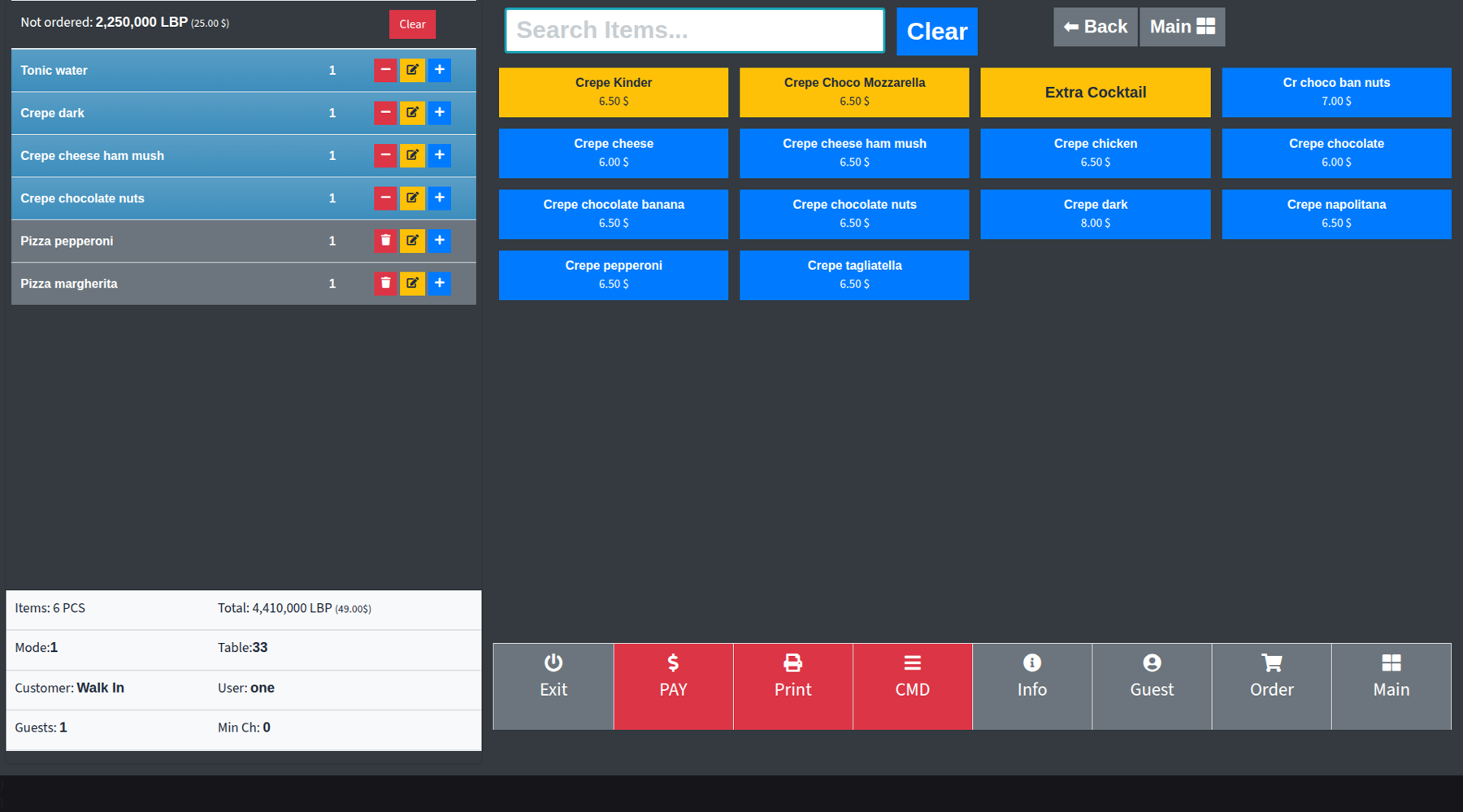
dineo — restaurant pos / order

A table mid-order: what is sent and what is not yet sent, the table, the waiter and the guests — with pay, print and kitchen commands one tap away.

Read the total line
Total: 4,410,000 LBP (49.00$)

Two currencies on one screen, live, at the rate you set — because that is how a bill is actually settled here. Most systems make you pick one and do the rest in your head.

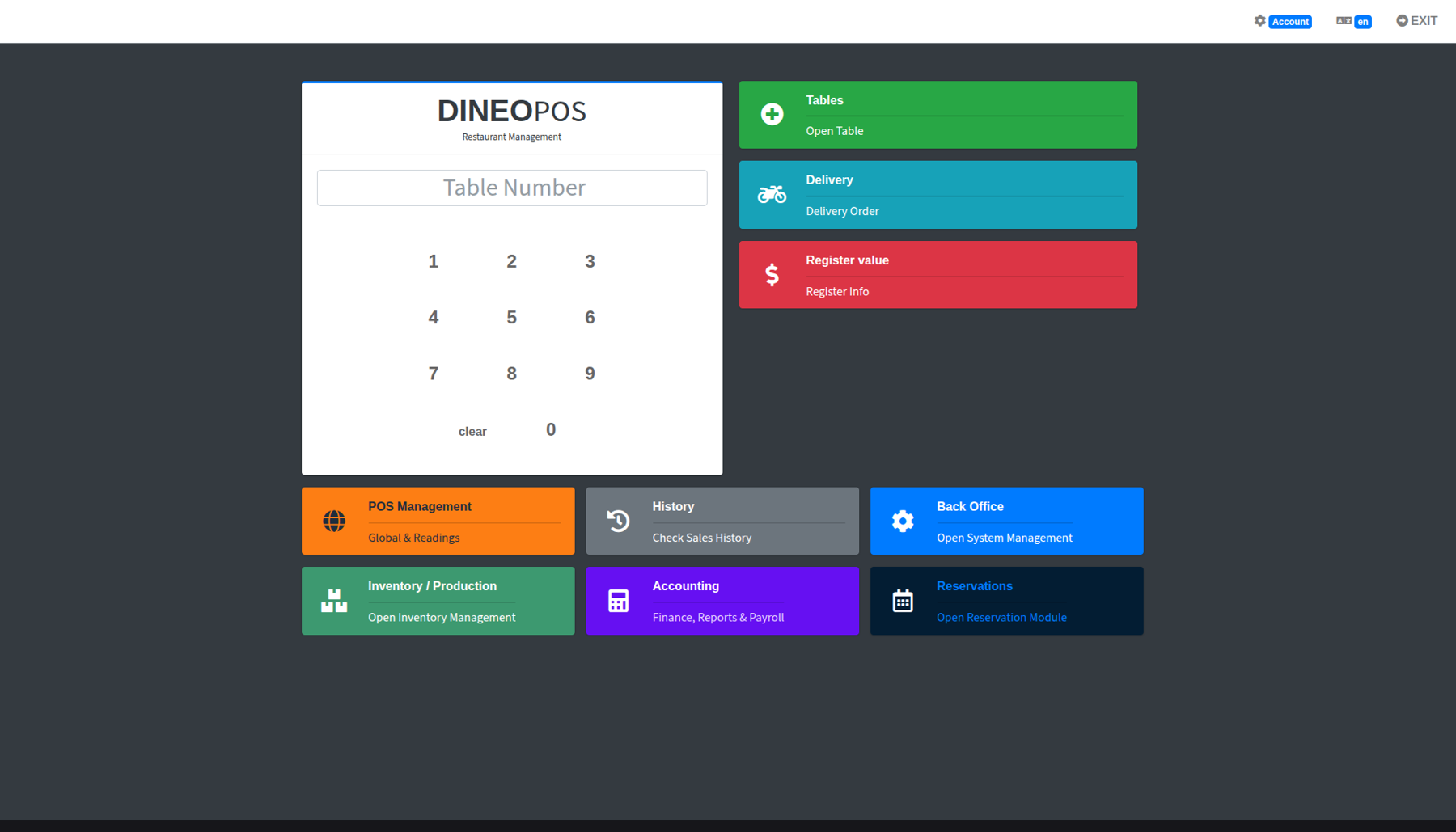
dineo — main screen

One start screen for the whole operation: open a table by number, take a delivery order, check the register — and back office, inventory, accounting and reservations one tap away.

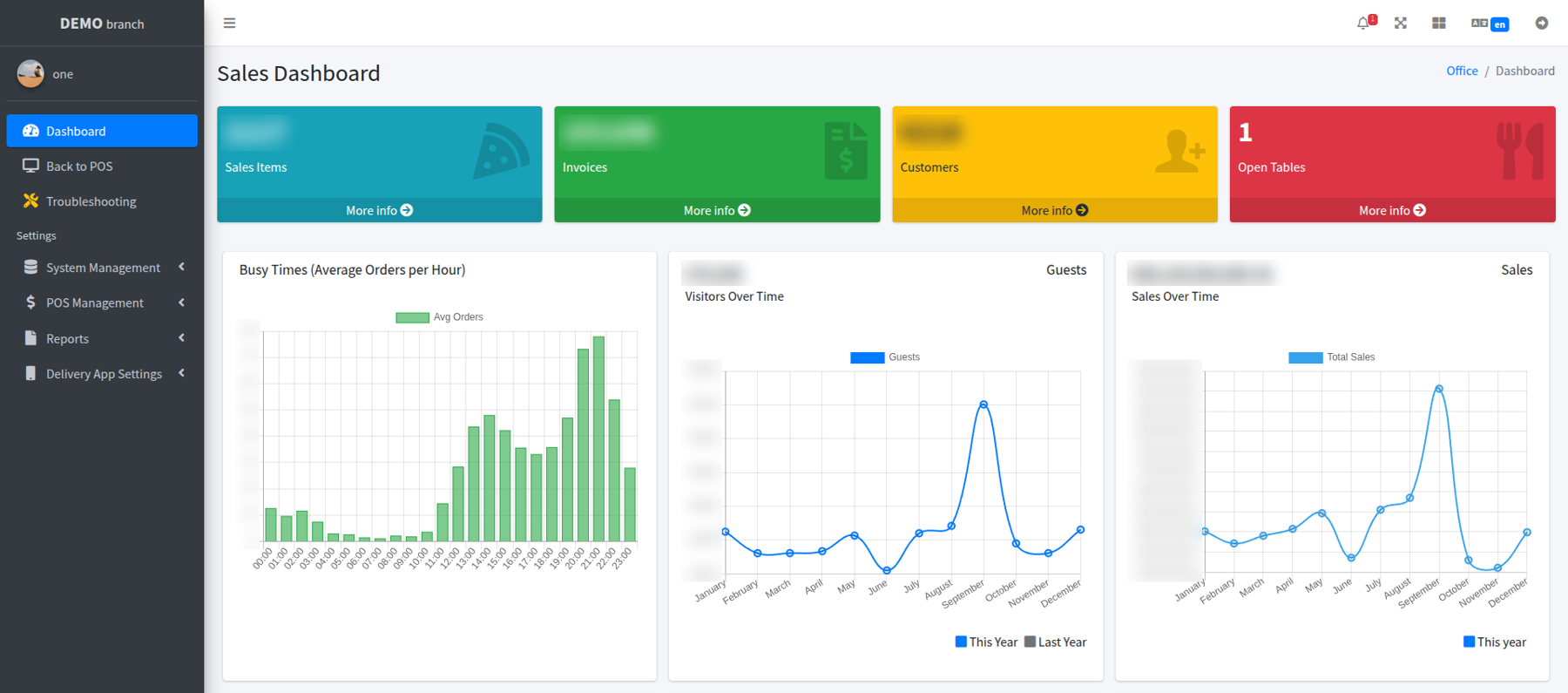
dineo — back office / sales dashboard

Busy hours, guests and sales across the year, by division and by service mode. The figures are blurred to protect a customer's data.

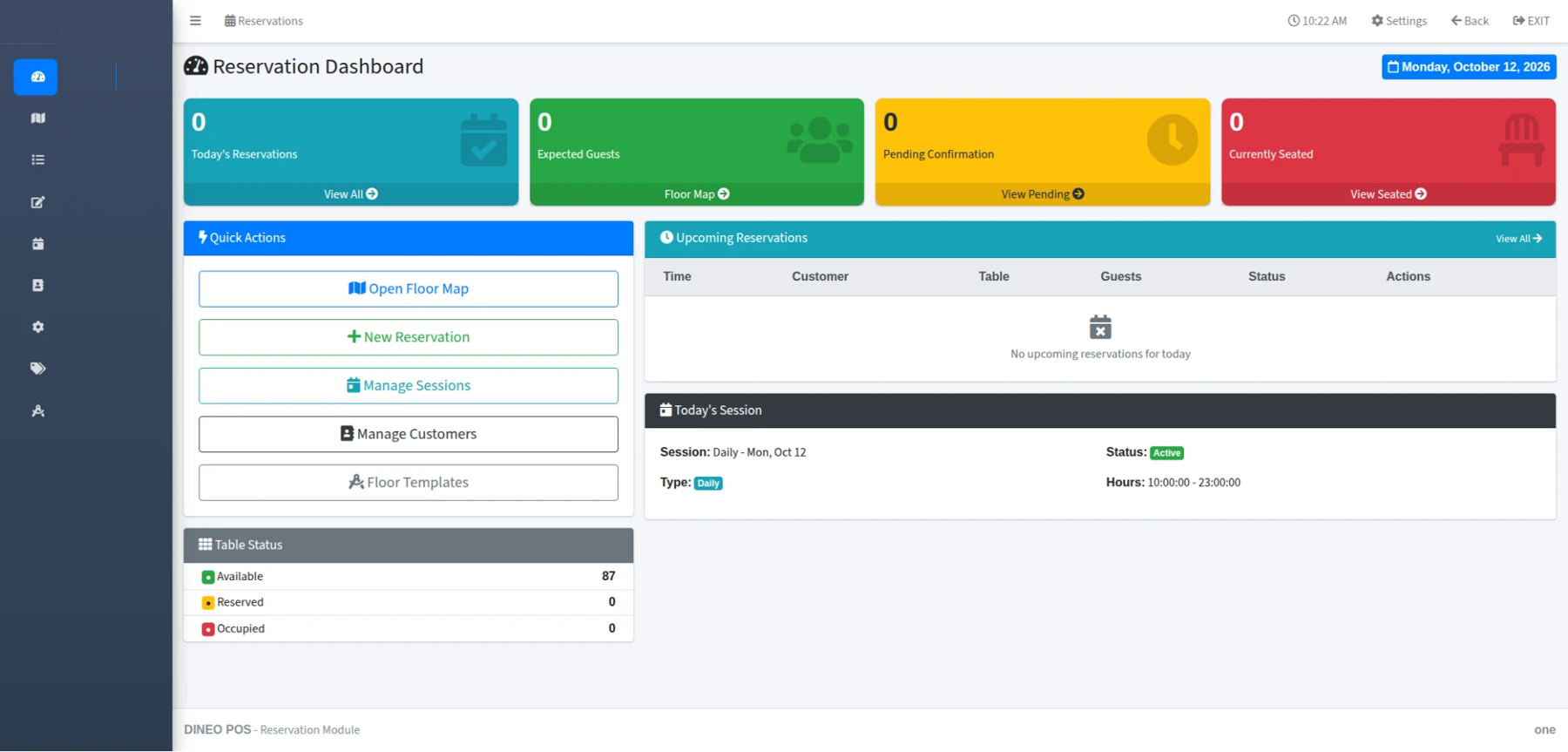
dineo — reservations / dashboard

The day at a glance: reservations, expected guests, pending confirmations and seated tables, with the floor map and today's session.

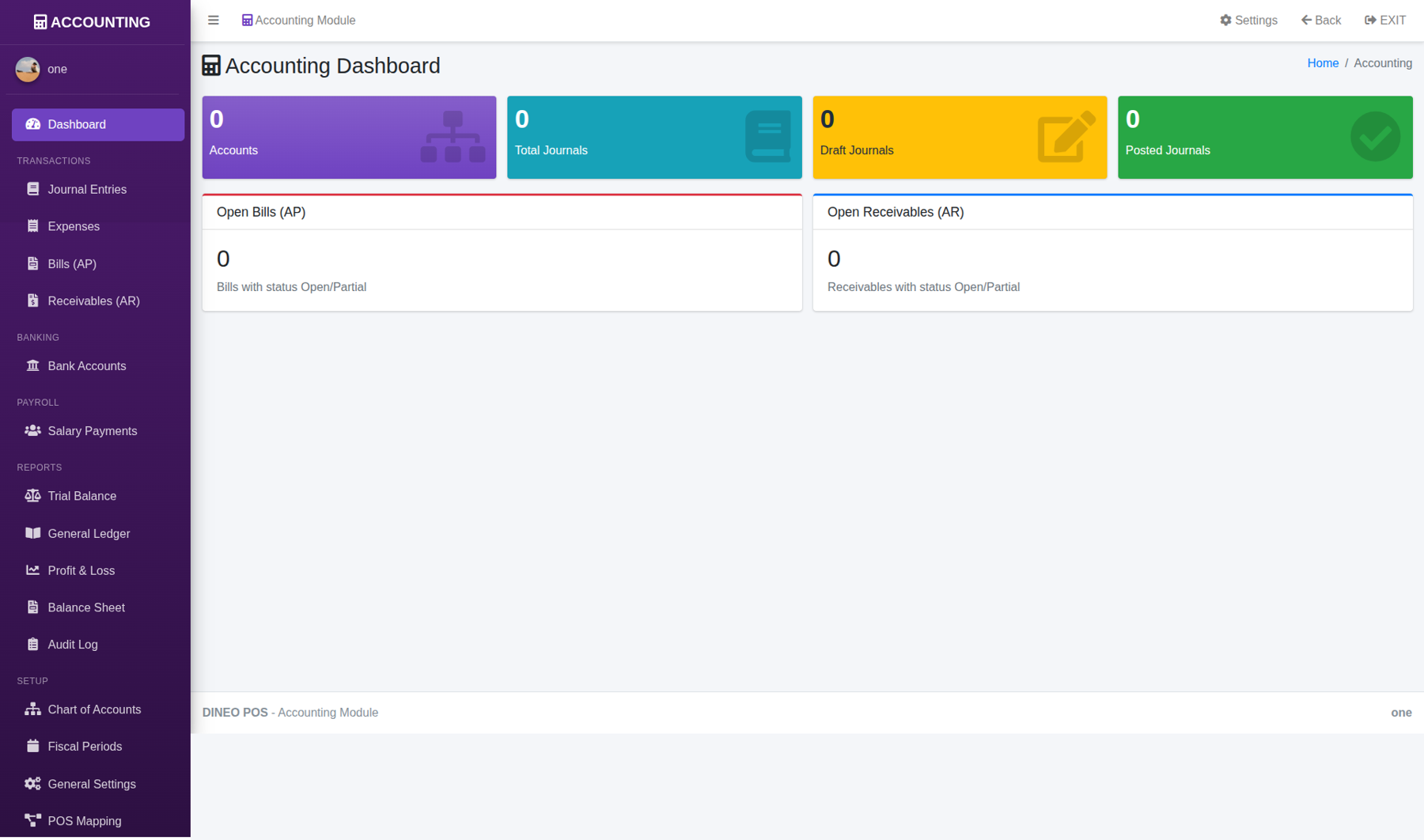
dineo — accounting / dashboard

Journals, expenses, bills and receivables, bank accounts and salary payments — through to trial balance, general ledger, profit & loss and balance sheet.

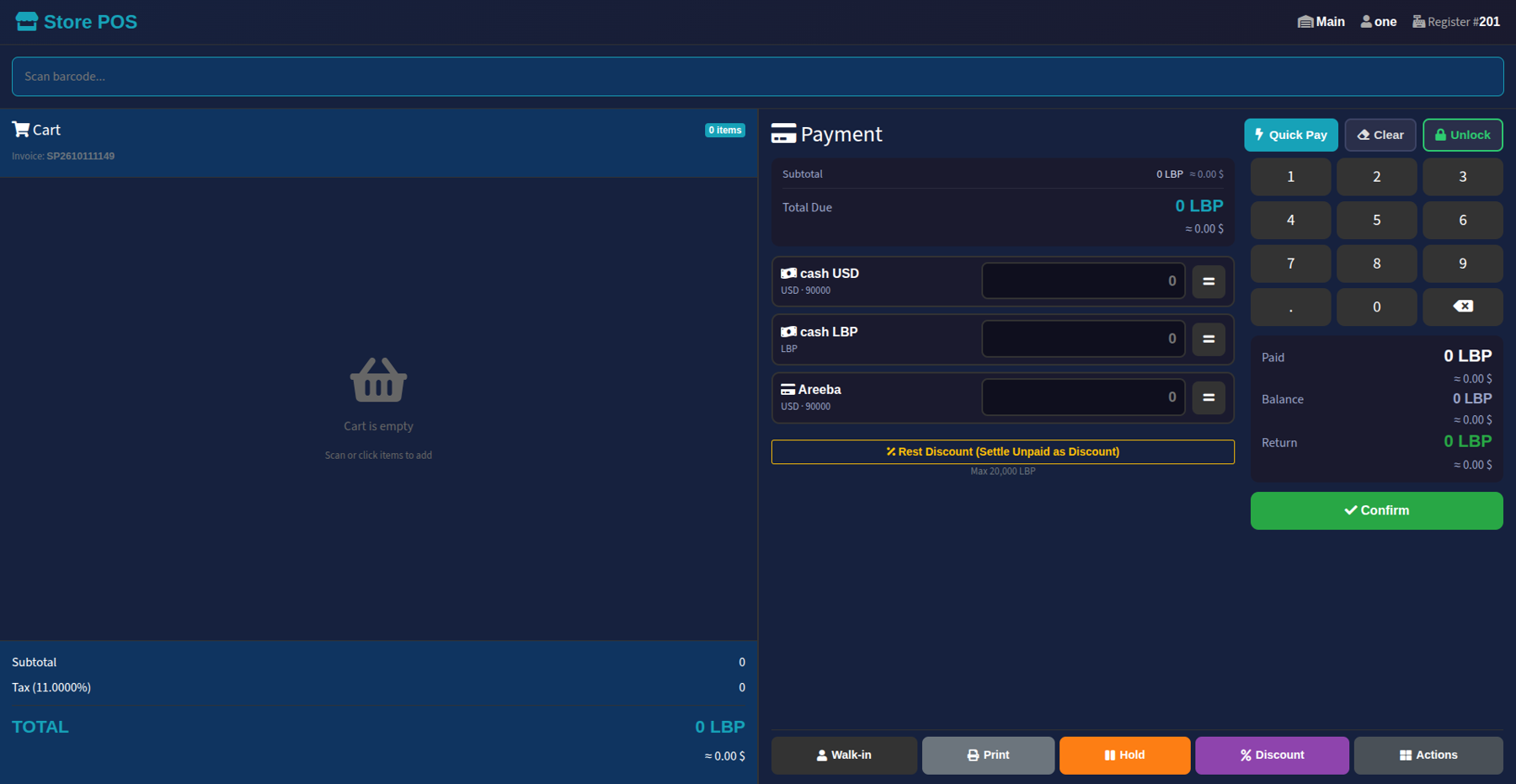
dineo — store pos / checkout

Barcode checkout for stores: one sale paid in dollars, pounds and card together, with the balance and change in both currencies. New — in pilot with its first customers.

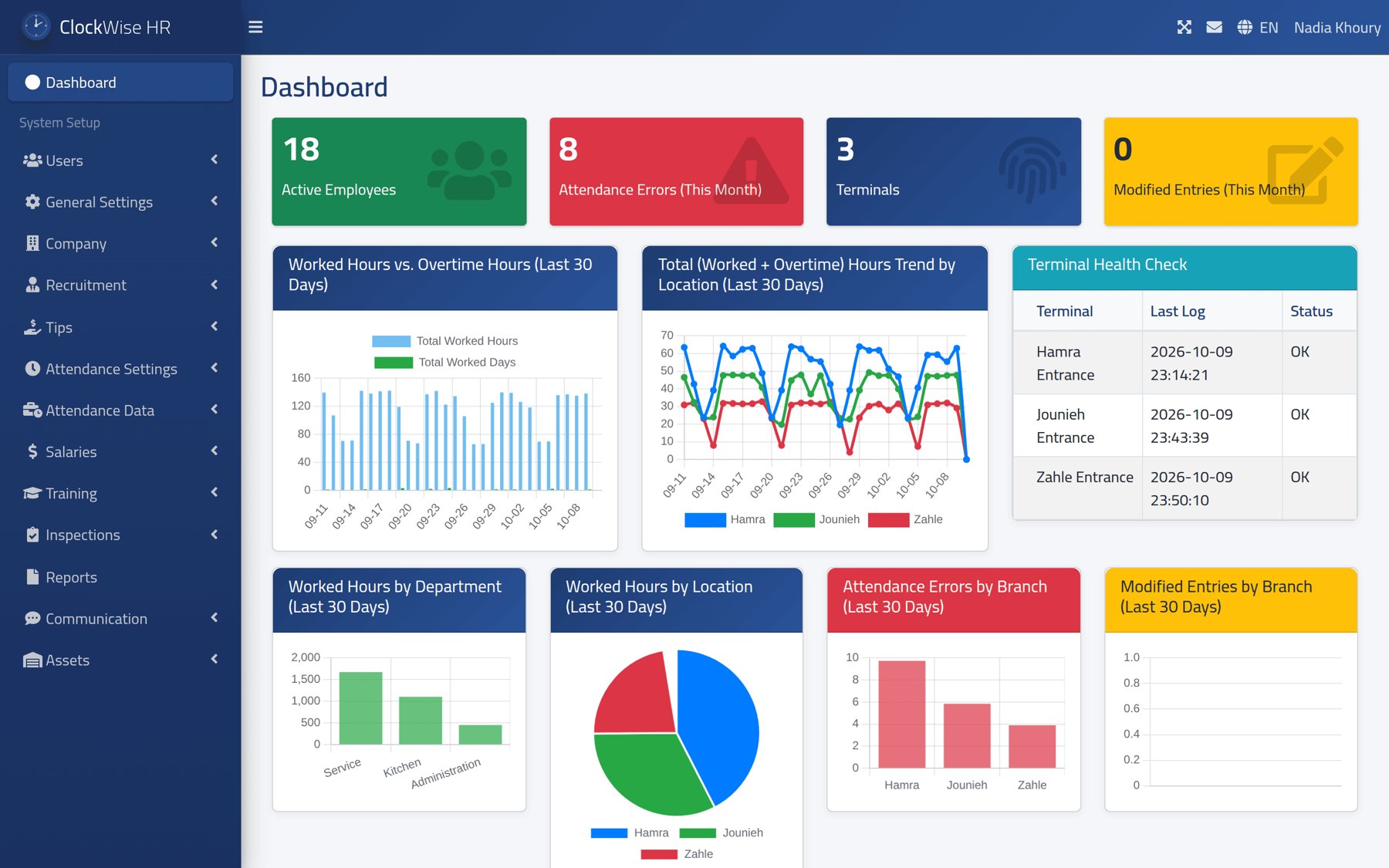
clockwise — dashboard

Active employees, this month's attendance errors, clocking machines and modified entries — with worked hours by branch and department, and a health check that shows any machine that has stopped sending.

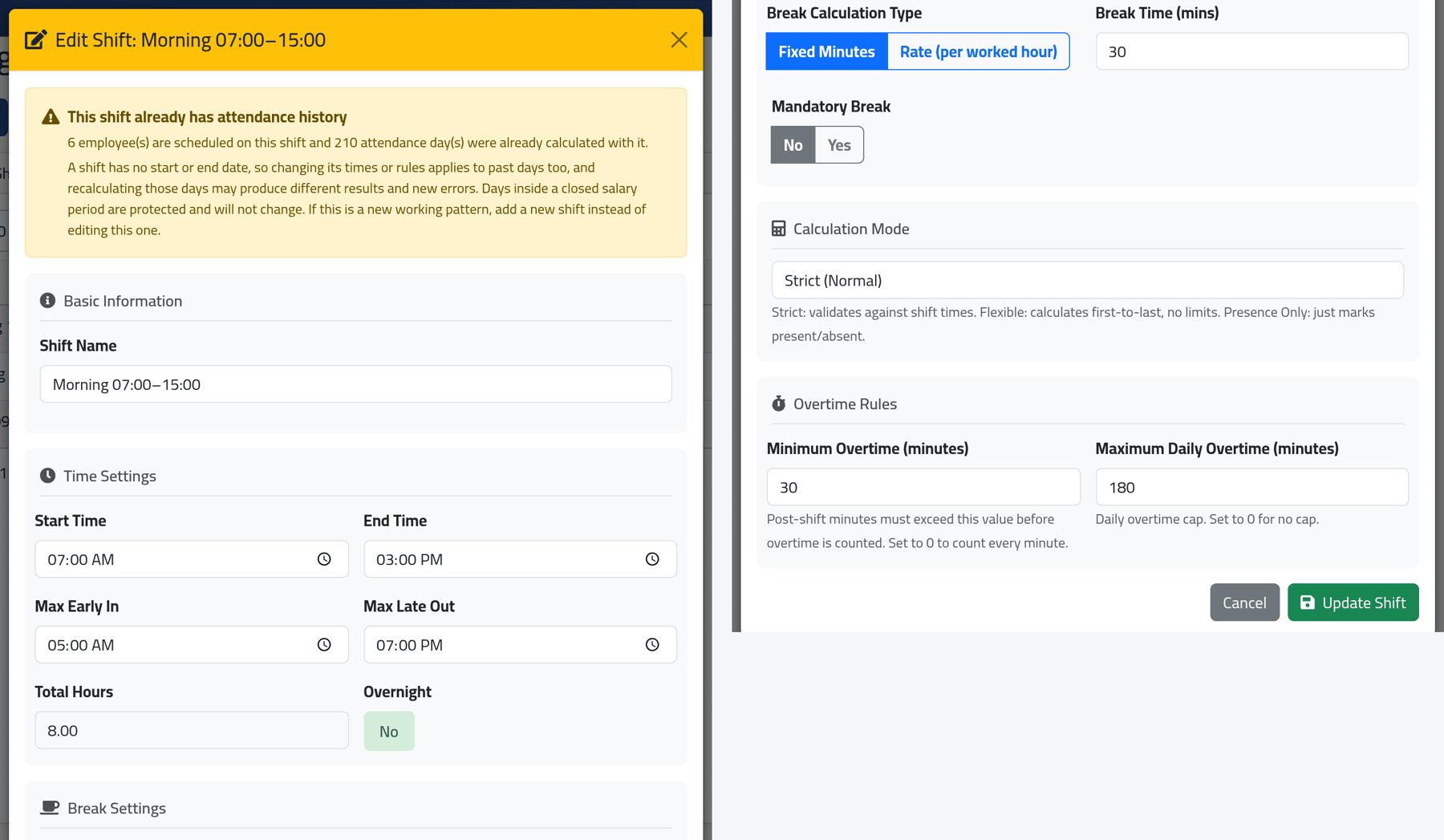
clockwise — attendance settings / shifts
ClockWise shift editor

Break calculation, overtime caps, strict or flexible matching, overnight handling — configured per shift, not per company.

What this screen is really showing
This shift already has attendance history. 6 employee(s) are scheduled on this shift and 210 attendance day(s) were already calculated with it. Days inside a closed salary period are protected and will not change.

Software that warns you before a change reaches back into past days, and tells you exactly what it will and will not touch. You don't build that from a specification — you build it after watching someone nearly do it.

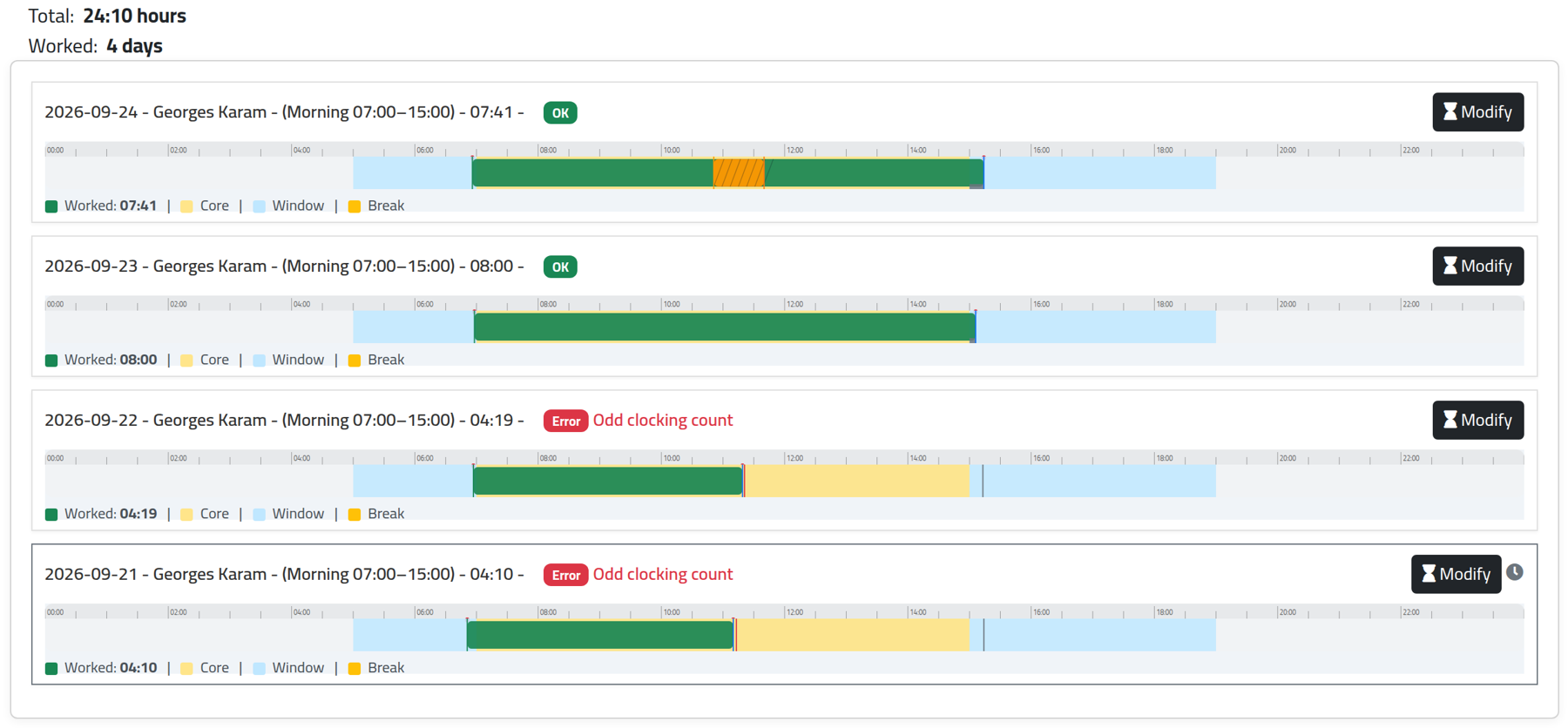
clockwise — attendance / visual summary
ClockWise attendance timeline

Every day drawn against the employee's own shift — core hours, allowed window, breaks and actual worked time. The same period switches to a tabular view for export.

Look at the red flag
Error — Odd clocking count

Someone clocked in and never clocked out. The system doesn't quietly guess a number and carry it into payroll — it stops, marks the day, and asks a human. Silent guesses are how payroll disputes start.

clockwise — employee / attendance setup
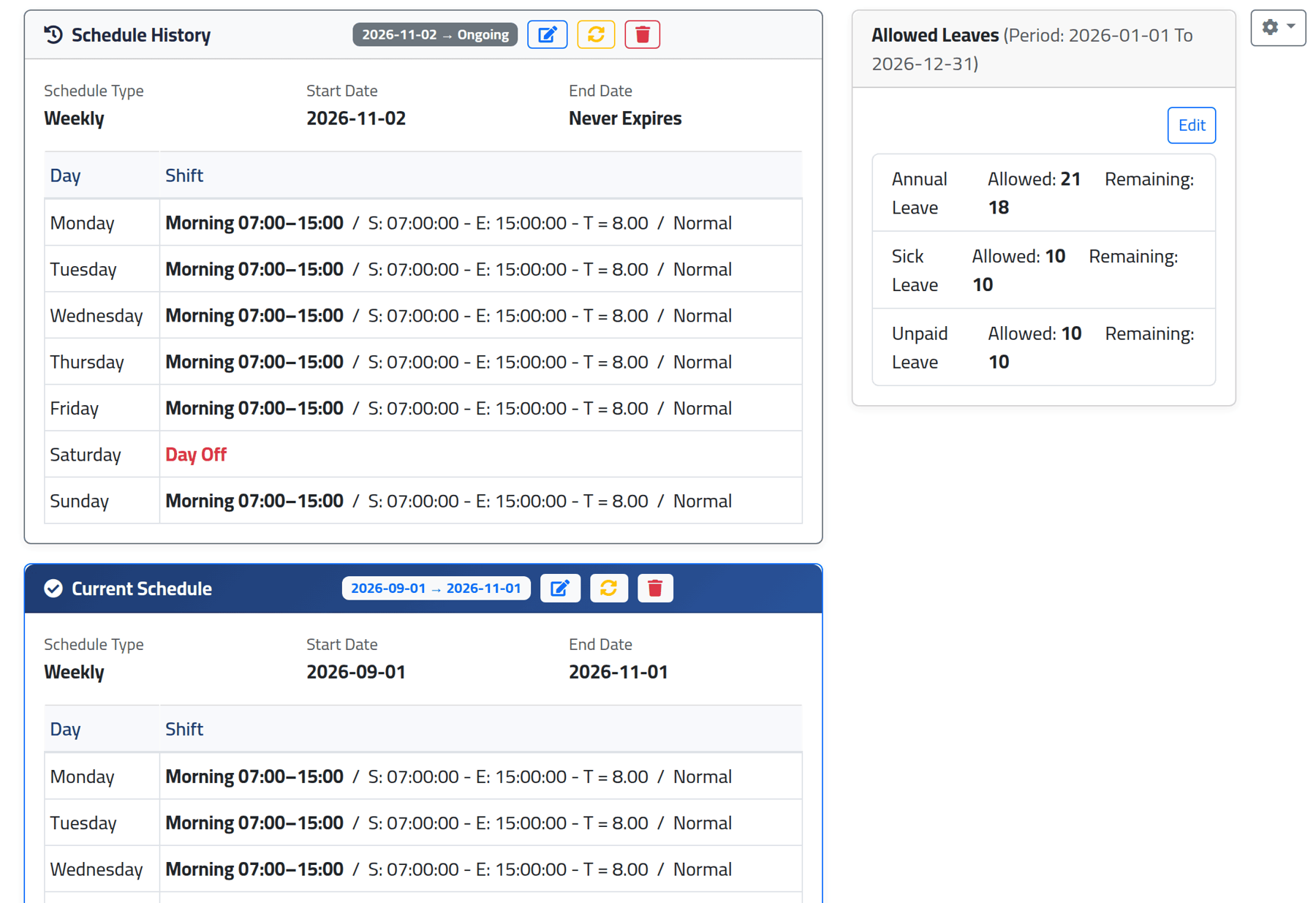
ClockWise schedule and leave balances

A different shift per weekday, overnight spans, days off — and every past schedule kept with its own date range, so last quarter is recalculated against the rules that were actually in force then. Leave balances sit beside it.

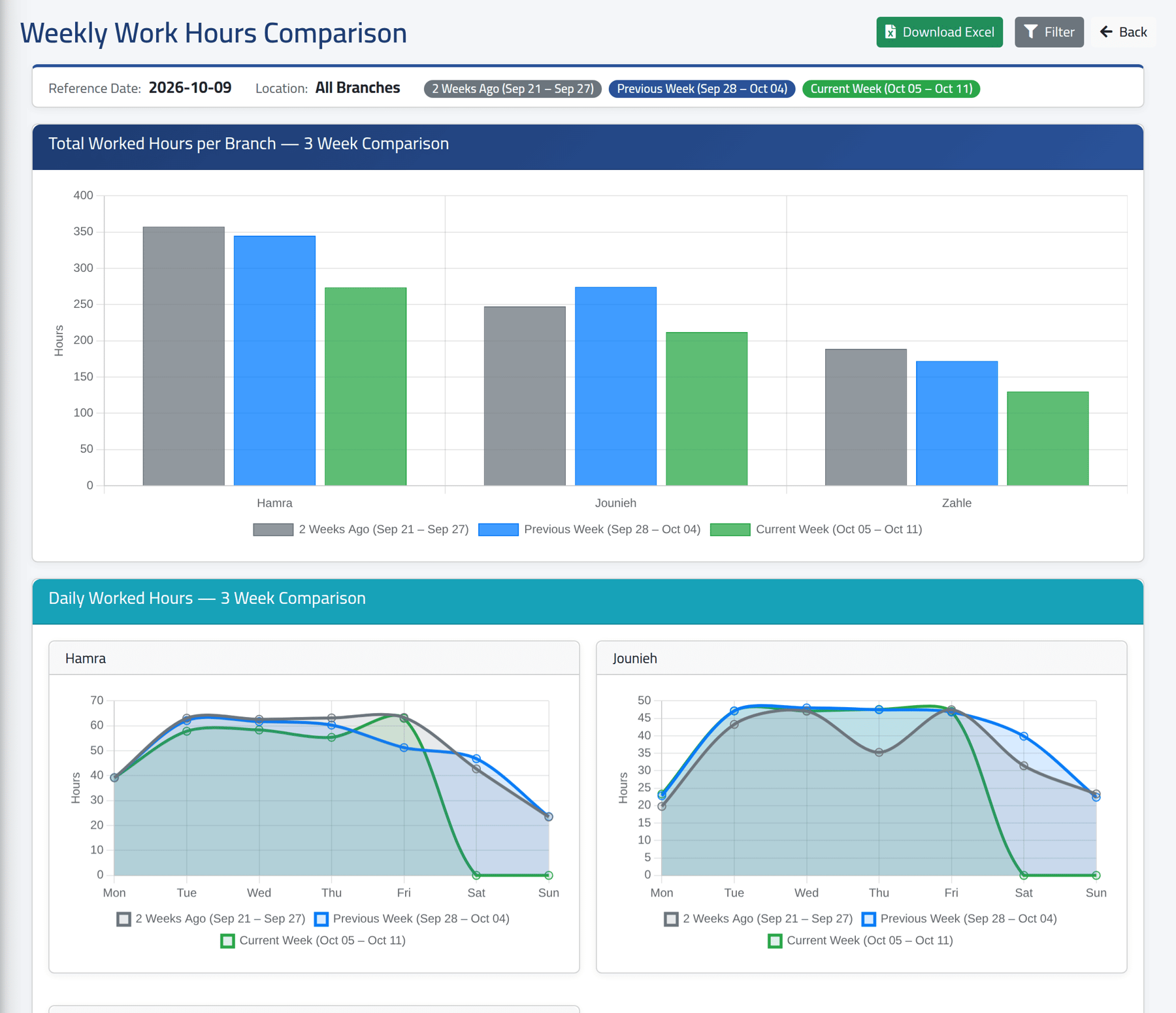
clockwise — reports / weekly hours comparison
ClockWise weekly hours comparison

Worked hours for every branch, three weeks side by side, with a day-by-day curve per branch and a comparison table — exportable to Excel.

How we work

A deployment, not a download.

Operational assessment

We look at how you actually run — branches, shifts, cash, menu or catalogue — before we quote anything.

Deployment plan

Hardware, network, branch structure, user roles, and how your data moves off your current system.

Controlled go-live

Installed, configured and validated, your team trained, and the first weeks monitored closely.

It keeps improving

Every installation has received updates and new features since it went live. That hasn't stopped since 2023.

Who we are

These systems weren't built to be sold.

They were built to solve problems inside businesses that were already running — then refined over years of daily use, by the people relying on them to get through a shift. Every feature in them was requested by someone standing at a counter.

Techs&Devs Solutions deploys and supports them for more businesses. The engineers who built the systems are the ones who install them, train your team and stand behind them after go-live.

Working with businesses of every size and sector, wherever they operate.

Get in touch

Get started

Tell us how you run.

We'll come back with a walkthrough built around your own branches and workflow — not a generic slideshow.

We review operational fit before scheduling anything.

The demo runs against your structure, with your kind of data.

If we're not the right fit, we'll say so.

Your details are used only to assess operational fit.

Thank you — request received.

We will contact you shortly to arrange a walkthrough around your own branches.